Crate indicatif
indicatif is a library for Rust that helps you build command line interfaces that report progress to users. It comes with various tools and utilities for formatting anything that indicates progress.
Platform support:
- Linux
- macOS
- Windows (colors require Windows 10)
Best paired with other libraries in the family:
Crate Contents
- Progress bars
ProgressBarfor bars and spinnersMultiProgressfor multiple bars
- Data Formatting
HumanBytesfor formatting bytesDecimalBytesfor formatting bytes using SI prefixesBinaryBytesfor formatting bytes using ISO/IEC prefixesHumanDurationfor formatting durationsHumanCountfor formatting large countsHumanFloatCountfor formatting large float counts
Progress Bars and Spinners
indicatif comes with a ProgressBar type that supports both bounded
progress bar uses as well as unbounded "spinner" type progress reports.
Progress bars are Sync and Send objects which means that they are
internally locked and can be passed from thread to thread.
Additionally a MultiProgress utility is provided that can manage
rendering multiple progress bars at once (eg: from multiple threads).
To whet your appetite, this is what this can look like:
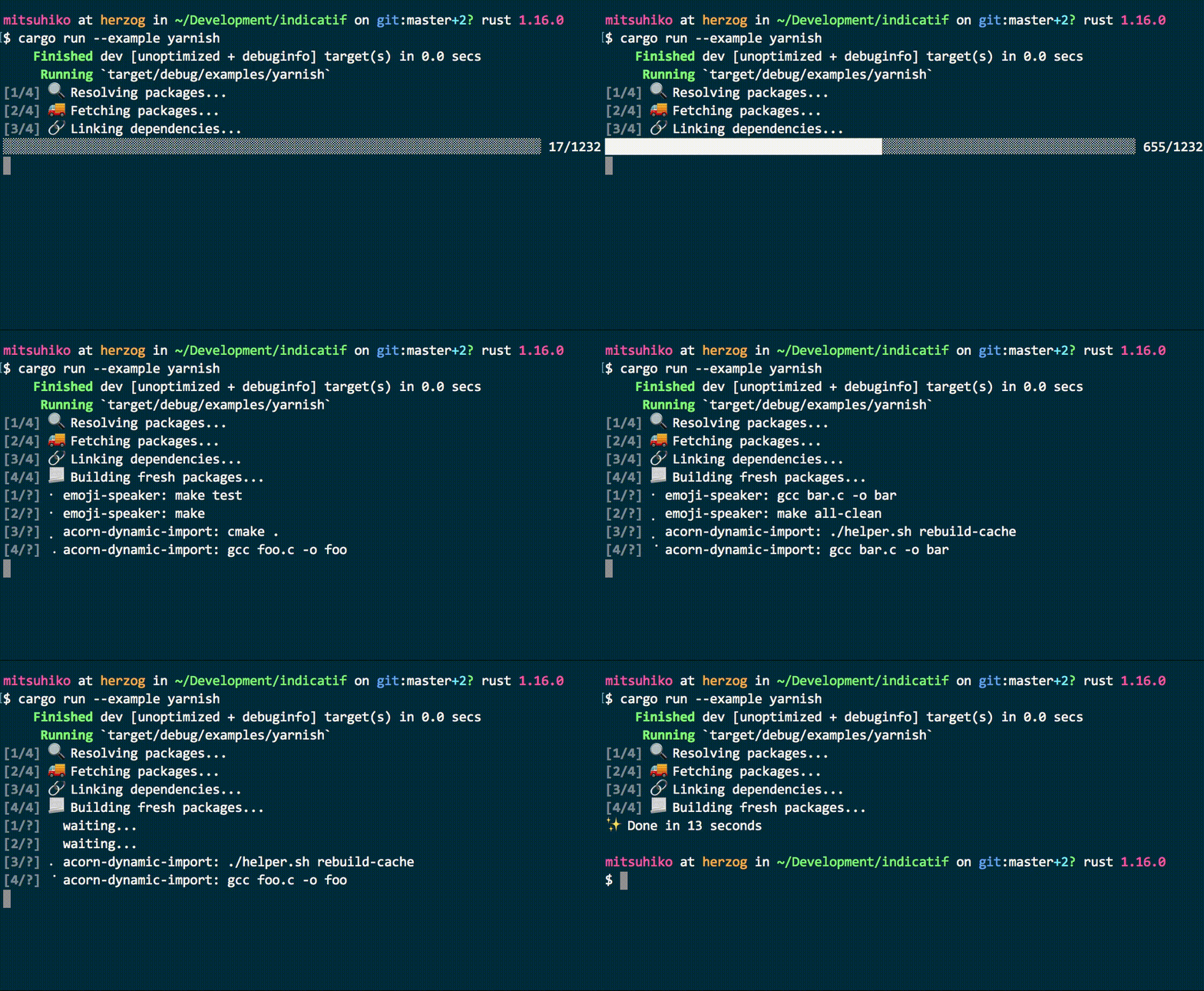
Progress bars are manually advanced and by default draw to stderr. When you are done, the progress bar can be finished either visibly (eg: the progress bar stays on the screen) or cleared (the progress bar will be removed).
use ProgressBar;
let bar = new;
for _ in 0..1000
bar.finish;
Spinners can be manually advanced with tick, or you can set them up
to spin automatically with enable_steady_tick:
use Duration;
use ProgressBar;
let bar = new_spinner;
bar.enable_steady_tick;
// ... do some work
bar.finish;
General progress bar behaviors:
- if a non terminal is detected the progress bar will be completely hidden. This makes piping programs to logfiles make sense out of the box.
- a progress bar only starts drawing when
set_message,inc,set_positionortickare called. In some situations you might have to calltickonce to draw it. - progress bars should be explicitly finished to reset the rendering for others. Either by also clearing them or by replacing them with a new message / retaining the current message.
- the default template renders neither message nor prefix.
Iterators
Similar to tqdm, progress bars can be associated with an iterator. For example:
use ProgressIterator;
for _ in .progress
See the ProgressIterator trait for more
methods to configure the number of elements in the iterator or change
the progress bar style. Indicatif also has optional support for parallel
iterators with Rayon. In your
Cargo.toml, use the "rayon" feature:
[dependencies]
indicatif = {version = "*", features = ["rayon"]}
And then use it like this:
# extern crate rayon;
use ParallelProgressIterator;
use ;
let v: = .collect;
let v2: = v.par_iter.progress_count.map.collect;
assert_eq!;
Or if you'd like to customize the progress bar:
# extern crate rayon;
use ;
use ;
// Alternatively, use `ProgressBar::new().with_style()`
let style = default_bar;
let v: = .collect;
let v2: = v.par_iter.progress_with_style.map.collect;
assert_eq!;
Templates
Progress bars can be styled with simple format strings similar to the
ones in Rust itself. The format for a placeholder is {key:options}
where the options part is optional. If provided the format is this:
<^>             for an optional alignment specification (left, center and right respectively)
WIDTH           an optional width as positive integer
!               an optional exclamation mark to enable truncation
.STYLE          an optional dot separated style string
/STYLE          an optional dot separated alternative style string
For the style component see Style::from_dotted_str
for more information. Indicatif uses the console base crate for all
colorization and formatting options.
Some examples for templates:
[{elapsed_precise}] {bar:40.cyan/blue} {pos:>7}/{len:7} {msg}
This sets a progress bar that is 40 characters wide and has cyan as primary style color and blue as alternative style color. Alternative styles are currently only used for progress bars.
Example configuration:
# use ;
# let bar = new;
bar.set_style;
The following keys exist:
bar: renders a progress bar. By default 20 characters wide. The style string is used to color the elapsed part, the alternative style is used for the bar that is yet to render.wide_bar: likebarbut always fills the remaining space. It should not be used withwide_msg.spinner: renders the spinner (current tick string). Note that spinners do not automatically tick by default. You either need to callenable_steady_tickor manually calltick.prefix: renders the prefix set on the progress bar.msg: renders the currently set message on the progress bar.wide_msg: likemsgbut always fills the remaining space and truncates. It should not be used withwide_bar.pos: renders the current position of the bar as integerhuman_pos: renders the current position of the bar as an integer, with commas as the thousands separator.len: renders the amount of work to be done as an integerhuman_len: renders the total length of the bar as an integer, with commas as the thousands separator.percent: renders the current position of the bar as a percentage of the total length (as an integer).percent_precise: renders the current position of the bar as a percentage of the total length (with 3 fraction digits).bytes: renders the current position of the bar as bytes (alias ofbinary_bytes).total_bytes: renders the total length of the bar as bytes (alias ofbinary_total_bytes).decimal_bytes: renders the current position of the bar as bytes using power-of-10 units, i.e.MB,kB, etc.decimal_total_bytes: renders the total length of the bar as bytes using power-of-10 units, i.e.MB,kB, etc.binary_bytes: renders the current position of the bar as bytes using power-of-two units, i.e.MiB,KiB, etc.binary_total_bytes: renders the total length of the bar as bytes using power-of-two units, i.e.MiB,KiB, etc.elapsed_precise: renders the elapsed time asHH:MM:SS.elapsed: renders the elapsed time as42s,1metc.per_sec: renders the speed in steps per second.bytes_per_sec: renders the speed in bytes per second (alias ofbinary_bytes_per_sec).decimal_bytes_per_sec: renders the speed in bytes per second using power-of-10 units, i.e.MB,kB, etc.binary_bytes_per_sec: renders the speed in bytes per second using power-of-two units, i.e.MiB,KiB, etc.eta_precise: the remaining time (likeelapsed_precise).eta: the remaining time (likeelapsed).duration_precise: the extrapolated total duration (likeelapsed_precise).duration: the extrapolated total duration time (likeelapsed).
If the list above does not contain the value you need, consider creating a custom
[ProgressTracker][crate::style::ProgressTracker] implementation.
The design of the progress bar can be altered with the integrated
template functionality. The template can be set by changing a
ProgressStyle and attaching it to the progress bar.
Human Readable Formatting
There are some formatting wrappers for showing elapsed time and file sizes for human users:
# use Duration;
use ;
assert_eq!;
assert_eq!;
assert_eq!;
assert_eq!;
Feature Flags
rayon: adds rayon supportimproved_unicode: adds improved unicode support (graphemes, better width calculation)
Modules
Structs
- BinaryBytes Formats bytes for human readability using ISO/IEC prefixes
- DecimalBytes Formats bytes for human readability using SI prefixes
- FormattedDuration Wraps an std duration for human basic formatting.
- HumanBytes Formats bytes for human readability
- HumanCount Formats counts for human readability using commas
- HumanDuration Wraps an std duration for human readable formatting.
- HumanFloatCount Formats counts for human readability using commas for floats
- MultiProgress Manages multiple progress bars, potentially from different threads.
- ProgressBar A progress bar or spinner
- ProgressBarIter Wraps an iterator to display its progress.
- ProgressDrawTarget Target for draw operations
- ProgressState The state of a progress bar at a moment in time.
- ProgressStyle
-
WeakProgressBar
A weak reference to a
ProgressBar.
Enums
- MultiProgressAlignment Vertical alignment of a multi progress.
- ProgressFinish Behavior of a progress bar when it is finished
Traits
- ProgressIterator Wraps an iterator to display its progress.
- TermLike A trait for minimal terminal-like behavior.